
Its rounds a number away from zero to the nearest odd integer.
Syntax
ODD(number)
Argument
| Parameter | Requirement | Valid Input |
| number | Required | Any real number |
Key Behavior
- Rounding Rules:
- Positive numbers: Rounds up to next odd integer.
- =ODD(1.9) → 3 (next odd above 1.9)
- Negative numbers: Rounds down to next odd integer (more negative).
- =ODD(-2.8) → -3 (next odd below -2.8)
- Odd integers: Returns unchanged.
- =ODD(5) → 5
- Positive numbers: Rounds up to next odd integer.
- Error Handling:
- #VALUE! for non-numeric inputs.
- Special Cases:
| Input | Output | Explanation |
| 0 | 1 | Rounds away from zero |
| -1 | -1 | Already odd |
| 2.1 | 3 | Next odd above |
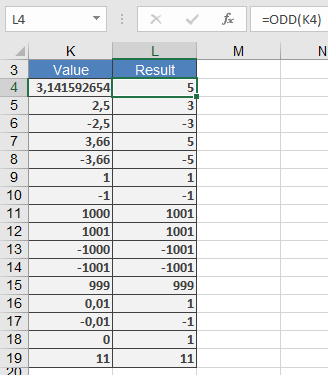
Examples
Comparison with Similar Functions
| Function | Direction | Target | Example (Input: 2.5) |
| ODD() | Away from zero | Next odd | 3 |
| EVEN() | Away from zero | Next even | 4 |
| CEILING() | Up | Specified multiple | Depends on significance |
| FLOOR() | Down | Specified multiple | Depends on significance |
Why This Matters
- Data Standardization: Enforce odd-numbered IDs or codes.
- Mathematical Modeling: Odd-step simulations (e.g., cellular automata).
Related Functions
- EVEN(): Rounds to nearest even integer.
- INT(): Truncates to integer (toward zero).
- MROUND(): Rounds to specified multiple.