
This function multiplies all given numbers or ranges and returns the product.
Syntax
PRODUCT(number1; [number2]; …)
Arguments
| Parameter | Requirement | Valid Input |
| number1 | Required | Number, cell reference, or range |
| number2,… | Optional | Additional numbers/ranges (up to 255 total) |
Key Properties
- Behavior:
- Multiplies all numeric values in arguments.
- Ignores empty cells, text, or logical values (TRUE/FALSE).
- Returns 0 if any argument is zero.
- Mathematical Notation:
PRODUCT(a,b,c)=a×b×c
-
- Analogous to the Π (Pi) symbol in mathematics for sequential products.
- Alternatives:
- Use the * operator for simple multiplication: =A1*A2*A3.
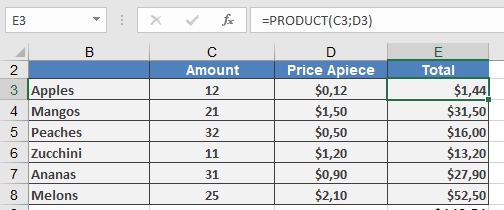
Examples
Why This Matters
- Efficiency: Faster than manual * chains for large ranges.
- Error-Resistant: Skips non-numeric values automatically.
- Financial/Statistical Use:
- Compound growth calculations.
- Volume/area computations.
Related Functions
- SUMPRODUCT(): Multiplies then sums ranges.
- SUM(): Adds values.
- FACT(): Factorial (product of integers up to *n*).