
Its Calculates the sum of a power series with the formula:
y = a₁xⁿ + a₂xⁿ⁺ᵐ + a₃xⁿ⁺²ᵐ + … + aₖxⁿ⁺ᵏᵐ
The number of terms equals the number of coefficients provided.
Syntax:
SERIESSUM(x; n; m; coefficients)
Arguments:
| Argument | Description |
| x (required) | Independent variable value for the series. |
| n (required) | Initial power of *x* (first term). |
| m (required) | Increment added to *n* for each subsequent term. |
| coefficients (required) | Array of coefficients (a₁, a₂, …, aₖ). Determines the number of terms. |
Background:
A power series approximates functions using an expansion point (x₀). Accuracy improves with more terms:
Σ aₖ(x – x₀)ⁿ⁺ᵏᵐ
Examples:
Example 1: Calculating Euler’s Number (*e*)
Formula:
=SERIESSUM(1, 0, 1, {1, 1, 0.5, 0.16666667, 0.04166667, 0.00833333, 0.00019841})
Returns: 2.71686508
Coefficients Explained:
- a₁ = 1 = 1/0!
- a₂ = 1 = 1/1!
- a₃ = 0.5 = 1/2!
- …
- a₇ = 0.00019841 ≈ 1/6!
Example 2: Sine Function Approximation
- Inputs (B3:C9):
- *x* = π/4 (45° in radians)
- Coefficients: {1, -0.166667, 0.008333, -0.000198} (Taylor series for sine)
- Formula (Cell E7):
=SERIESSUM(B3, 1, 2, {1, -0.166667, 0.008333, -0.000198})
Result: 0.707107
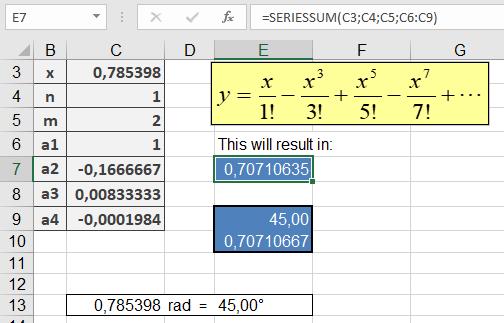
- Validation:
- =DEGREES(B3) → Confirms *x* = 45°
- =SIN(B3) → Returns 0.707107 (matches SERIESSUM() to 6 decimals)
Key Notes:
- Used in engineering/math to approximate functions (e.g., eˣ, sin(x)).
- More coefficients → higher precision.
- Negative coefficients alternate signs (e.g., sine series).