
Its adds all numbers in a range that meet multiple specified criteria (introduced in Excel).
Syntax:
SUMIFS(sum_range; criteria_range1; criteria1; [criteria_range2; criteria2]; …)
Arguments:
| Argument | Description |
| sum_range (required) | Range of cells to sum |
| criteria_range1 (required) | First range to evaluate |
| criteria1 (required) | First condition (number, expression, or text) |
| criteria_range2, criteria2,… (optional) | Additional ranges/criteria (up to 127 pairs) |
Key Features:
- Criteria Formats:
- Number: 32
- Comparison: « >32 »
- Text: « apples » (exact) or « a* » (wildcard)
- Cell reference: I7
- Behavior:
- All criteria must be met for inclusion
- Case-insensitive text matching
- Supports wildcards (*, ?)
- More flexible than SUMIF() (which allows only 1 criterion)
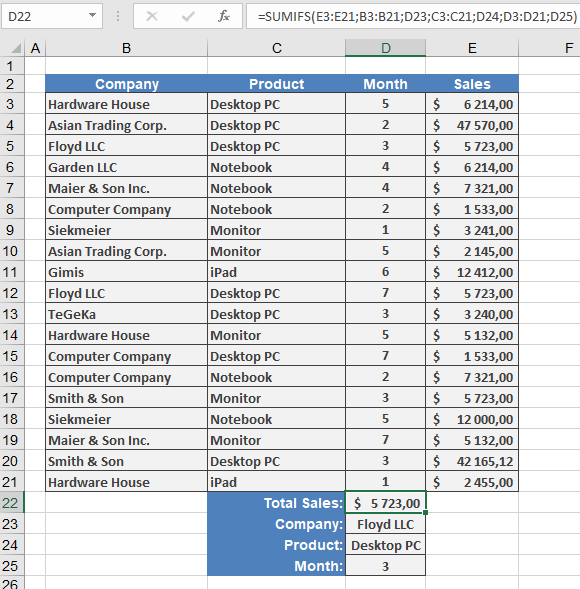
Example: Sales by Month, Company & Product
Scenario: Sum sales for « Contoso, Ltd. » purchasing « Desktop PC » in « Month 3 »
Data Structure:
B3:B21 = Companies
C3:C21 = Products
D3:D21 = Months
E3:E21 = Sales amounts
I7 = « Contoso, Ltd. »
I8 = « Desktop PC »
I9 = 3 (Month)
Formula:
=SUMIFS(E3:E21; B3:B21; I7; C3:C21; I8; D3:D21; I9)
Breakdown:
- Sums values in E3:E21 where:
- B3:B21 matches « Contoso, Ltd. »
- C3:C21 matches « Desktop PC »
- D3:D21 equals 3
- Returns $5,723
Practical Notes:
- Order of criteria doesn’t affect results
- Ranges must be same size (but non-contiguous)
- For single-criterion sums, SUMIF() is simpler
Common Errors:
- #VALUE!: Mismatched range sizes
- Unexpected results: Verify criteria syntax (e.g., « > »&I9 for dynamic comparisons)
Related Functions:
- SUMIF(): Single-criterion version
- COUNTIFS(): Count with multiple criteria
- AVERAGEIFS(): Average with multiple criteria