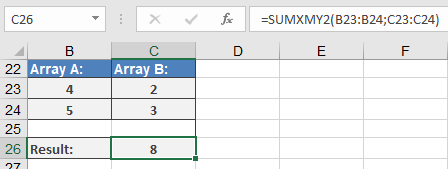
This function returns the sum of squares of differences of corresponding values in two arrays.
Syntax
SUMXMY2(array_x; array_y)
Arguments
- array_x(required) – The first array or range of values.
- array_y(required) – The second array or range of values.
Background
- The arguments should be numbers, names, arrays, or references containing numbers.
- If an array or a reference argument contains text, logical values, or empty cells, those values are ignored. However, cells with the value zero are included.
- If array_xand array_y have a different number of values, the SUMXMY2() function returns the #N/A
The equation for the sum of squared differences is:
Σ(x – y)²
The solution of this equation is built for the example (see Figure below) as follows:
- In two specified ranges:
- Range A:4, 5
- Range B:2, 3
The corresponding values are subtracted:
- First pair: 4 – 2 = 2
- Second pair: 5 – 3 = 2
- The differences are squared and summed (see Figure 16-37):
- 2² + 2² = 4 + 4 = 8