
This function returns the tangent of an angle.
Syntax
TAN(number)
Argument
- number (required) – The angle in radians for which you want the tangent.
Background
- In a right triangle, the tangent of an angle is the ratio of the length of the opposite side to the length of the adjacent side.
- The TAN() function requires the angle to be in radians. If the angle is given in degrees, convert it by multiplying by PI()/180 or using the RADIANS() function.
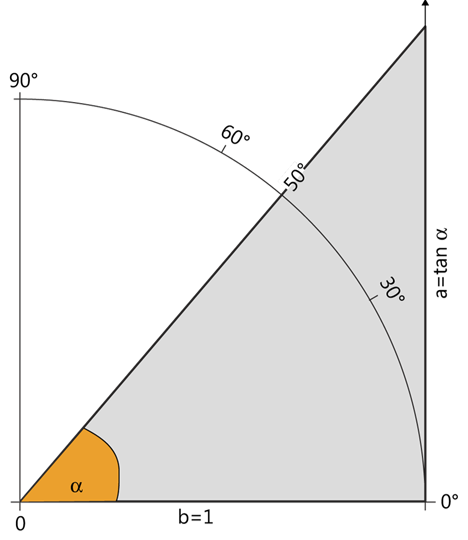
- For an angle α in a unit circle (r=1):
- As α increases from 0° to 90°, the tangent increases from 00 to +∞+∞ (see Figure below).
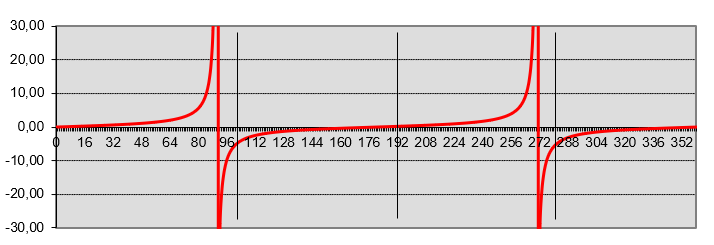
- In a coordinate system, plotting the angle αα on the x-axis and tan(α)tan(α) on the y-axis produces the curve shown in Figure below.
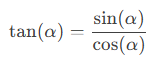
Tangent Relationship with Sine and Cosine:

Practical Application (Slope Calculation):
- The tangent describes the relationship between the gradient angle and the slope of a line.
- Example: A road with a gradient angle of 12°12° has a slope of tan(12°)≈0.21tan(12°)≈0.21, often displayed as 21% (21 meters elevation per 100 meters horizontally).
- Note: The tangent is undefined at 90° and −90° (vertical slope).
Example:
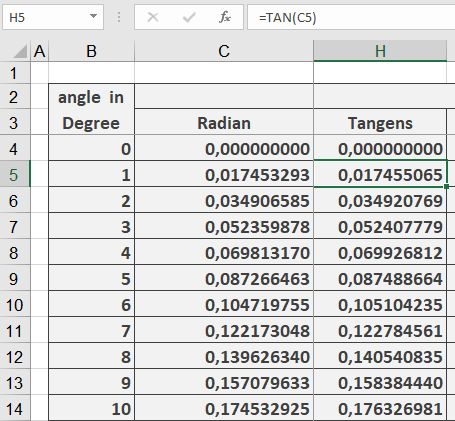
Key Steps:
- Convert degrees to radians (RADIANS()).
- Calculate tangent (TAN()).
- Multiply by distance and round (ROUND()).
- Add observer’s eye level.