
This function converts a binary number into a decimal number.
Syntax
BIN2DEC(number)
Argument
- number(required) – The binary number to be converted, which must:
- Be in two’s complement notation
- Contain no more than 10 digits
Background
For detailed information about number systems and two’s complement notation, refer to the « Number Systems » section in the introduction to these functions.
Examples
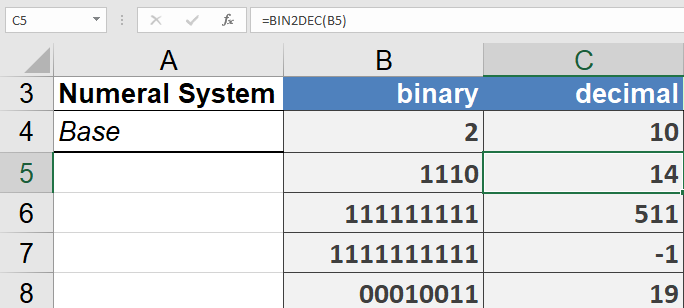
The following examples demonstrate the BIN2DEC() function:
- =BIN2DEC(1110)returns 14
- =BIN2DEC(111111111)returns 511
- =BIN2DEC(1111111111)returns -1 (demonstrating two’s complement representation)
- =BIN2DEC(1111111110)returns -2
Key Notes
- The function handles both positive and negative numbers through two’s complement representation
- The 10-digit limit is important as it determines the range of numbers that can be represented
- For positive numbers, the conversion is straightforward binary-to-decimal
- For negative numbers (indicated by a leading 1 in two’s complement), the function properly interprets the two’s complement notation