
This function returns the Bessel function of the first kind, Jₙ(x).
Syntax
BESSELJ(x ; n)
Arguments
- x (required)
The value at which to evaluate the function:- Must be a real number
- Valid range: approximately -1.34×10⁸ to +1.34×10⁸ (range varies with order n)
- n (required)
The order of the Bessel function:- Must be positive
- Non-integer values are truncated (decimal places ignored)
Background
The Bessel function Jₙ(x) is a solution to Bessel’s differential equation:
x²y » + xy’ + (x² – n²)y = 0
or
y » + (1/x)y’ + (1 – n²/x²)y = 0
For real ν, the function can be calculated using:

where Γ(y) is the gamma function.
Example
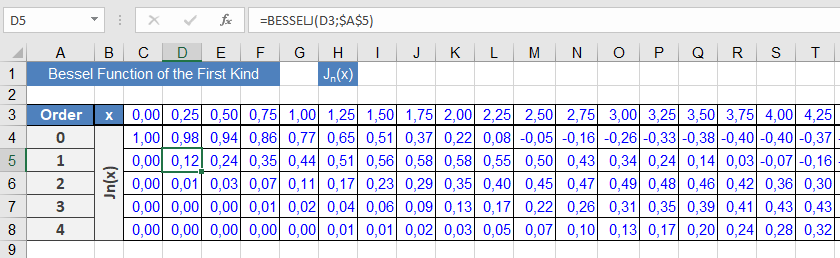
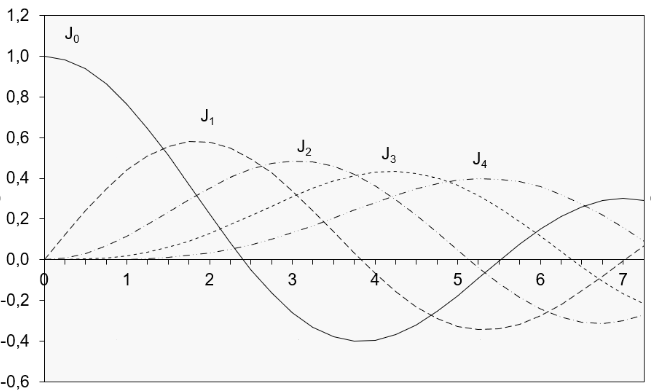
Due to the specialized nature of Bessel functions, this example focuses on their graphical representation (see Figures below).
Implementation notes:
- The sample worksheet calculates Jₙ(x) for orders 0 through 4
- Results are displayed in the graph shown in Figure above
- The oscillatory behavior characteristic of Jₙ(x) is clearly visible
Key Properties
- Oscillates with decreasing amplitude as x increases
- Jₙ(-x) = (-1)ⁿJₙ(x)
- For integer n, Jₙ and J₋ₙ are linearly dependent
- Satisfies various recurrence relations
Technical Applications
- Cylindrical wave propagation
- Heat conduction in circular geometries
- Solutions to Laplace’s equation in polar coordinates
- Modeling of drumhead vibrations
Computation Notes
- Calculated via power series expansion
- Accuracy depends on argument range and order
- Higher orders require more terms for convergence