
Its converts a decimal number to its octal (base-8) equivalent using two’s complement notation.
Syntax
DEC2OCT(number; [places])
Arguments
- number (required)
- Decimal integer to convert (range: -536,870,912 to +536,870,911)
- Non-integers are truncated (decimal places ignored)
- Negative values return 10-digit two’s complement octal
- places (optional)
- Minimum number of octal digits to display (1-10)
- Adds leading zeros for positive numbers
- Has no effect on negative numbers (always 10 digits)
- Decimal places are truncated if specified
Technical Background
The conversion uses two’s complement representation for negative values. For complete number system theory, see the « Number Systems » introduction section.
Examples
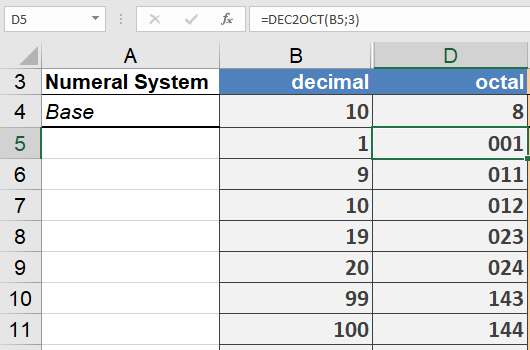
Key Specifications
- Input Range: -536,870,912 to 536,870,911
- Output Characteristics:
- Positive: Variable length (1-10 octal digits)
- Negative: Always 10 octal digits
- Special Handling:
- Negative numbers ignore places parameter
- Fractional values are truncated
- Leading zeros only applied to positive numbers
Common Applications
- Unix/Linux file permission systems
- Digital signal processing
- Embedded systems programming
- Legacy system interfaces