
Its calculates the absolute value (modulus) of a complex number. The complex number can be provided in either « x+yi » or « x+yj » format.
Syntax
IMABS(complex_number)
Argument
- complex_number (required)
A complex number in text format with:- Real and imaginary components
- Either « i » or « j » as the imaginary unit
- Examples: « 3+4i », « 5-2j », « -1+7i »
Technical Background
The absolute value of a complex number a + bi is calculated as:
√(a² + b²)
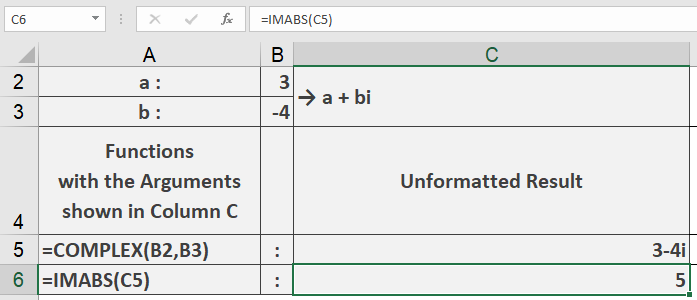
Example
=IMABS(« 3-4i ») // Returns 5
Additional Examples
=IMABS(« 5+12i ») // Returns 13
=IMABS(« 1+i ») // Returns 1.414213562 (√2)
=IMABS(« 0+1j ») // Returns 1
=IMABS(« -3-4j ») // Returns 5
Key Features
- Accepts both « i » and « j » notation
- Handles positive and negative components
- Returns a real number value
- Follows standard complex number mathematics
Error Conditions
- Returns #NUM! for:
- Invalid complex number format
- Missing imaginary unit
- Non-numeric components
Usage Notes
- Input must be text string in proper complex format
- Components can be integers or decimals
- Result is always a non-negative real number