
Its returns the complex conjugate of a complex number in rectangular form (x + yi or x + yj).
Syntax
IMCONJUGATE(complex_number)
Argument
- complex_number (required)
A text string representing a complex number in either:- « x+yi » format (mathematical convention)
- « x+yj » format (engineering convention)
Technical Background
For a complex number z = x + yi:
- The complex conjugate is z̅ = x – yi
- Geometric interpretation: Reflection across the real axis
- Key property: z·z̅ = x² + y² = |z|²
Example
=IMCONJUGATE(« 3-4i ») // Returns « 3+4i »
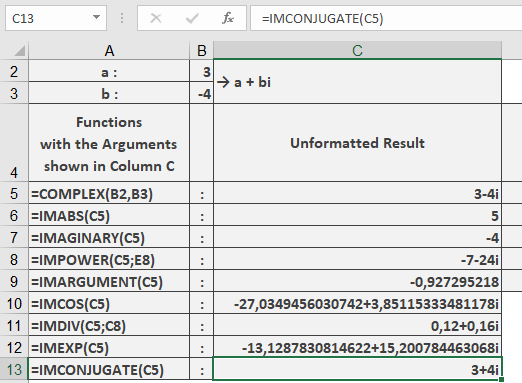
Additional Examples
=IMCONJUGATE(« 5+12j ») // Returns « 5-12j »
=IMCONJUGATE(« -1+i ») // Returns « -1-i »
=IMCONJUGATE(« 7 ») // Returns « 7 » (real numbers are unchanged)
=IMCONJUGATE(« 0-3i ») // Returns « 0+3i »
Key Features
- Preserves the original imaginary unit (i/j)
- Returns result as text string
- Handles all complex number formats
- Identity operation for real numbers
Error Conditions
- Returns #NUM! for:
- Invalid complex number format
- Non-numeric components
- Missing imaginary unit when needed
Usage Notes
- Essential for division of complex numbers
- Used in quantum mechanics (bra-ket notation)
- Important for calculating magnitudes:
=IMPRODUCT(« 3-4i », IMCONJUGATE(« 3-4i »)) // Returns « 25 » (3² + 4²)