
Its computes the exponential of a complex number, returning the result in rectangular form (x + yi). This is the complex analog of the standard EXP() function.
Syntax
IMEXP(complex_number)
Argument
- complex_number (required)
A complex exponent in either:- « x+yi » format (mathematical convention)
- « x+yj » format (engineering convention)
Technical Background
For a complex number z = x + yi:
IMEXP(z) = e^z = e^x · (cos y + i·sin y)
This implementation of Euler’s formula:
- Separates into magnitude (eˣ) and phase (eⁱʸ) components
- Converts the imaginary exponent using Euler’s identity
Example
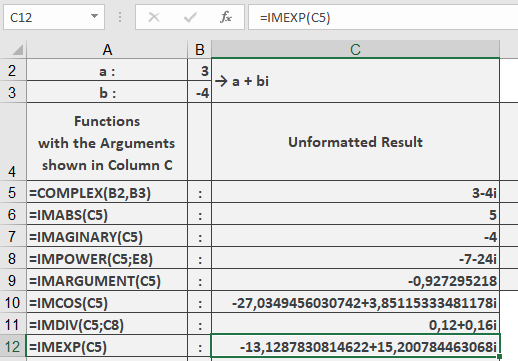
=IMEXP(« 3-4i ») // Returns « -13.1287831+15.2007845i »
Additional Examples
=IMEXP(« 1+i ») // Returns « 1.46869394+2.28735529i »
=IMEXP(« 0+πi ») // Returns « -1 » (Euler’s identity)
=IMEXP(« 2+0i ») // Returns « 7.3890561 » (matches real EXP(2))
Key Features
- Maintains 8 decimal place precision
- Preserves input’s imaginary unit convention
- Handles all valid complex number formats
- Periodic in imaginary dimension (period 2π)
Error Conditions
- Returns #NUM! for:
- Invalid complex number format
- Non-numeric components
- Missing imaginary unit when required
Usage Notes
- For pure real numbers, equivalent to EXP()
- For pure imaginary numbers, reduces to Euler’s formula
- Essential for:
- Complex differential equations
- Fourier transforms
- Quantum mechanical wavefunctions