
Its calculates the product of complex numbers in rectangular form (x + yi or x + yj). Supports multiplication of 1 to 255 complex numbers.
Syntax
IMPRODUCT(complex_number1; [complex_number2]; …)
Arguments
- complex_number1 (required)
First complex factor in « x+yi » or « x+yj » format - complex_number2,… (optional)
Additional complex factors (up to 255 total)
Technical Background
For two complex numbers z₁ = a + bi and z₂ = c + di:
z₁·z₂ = (ac – bd) + i(ad + bc)
For n complex numbers, multiplication is performed sequentially following the associative property of complex multiplication.
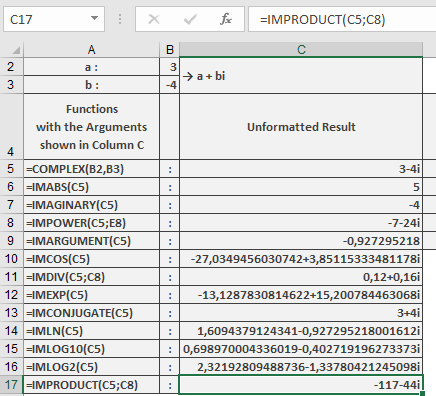
Example
=IMPRODUCT(« 3-4i », « -1-24i ») // Returns « -117-44i »
Additional Examples
=IMPRODUCT(« 1+i », « 1-i ») // Returns « 2 » (real number)
=IMPRODUCT(« i », « i ») // Returns « -1 »
=IMPRODUCT(« 2+3i », « 4-5i », « 6 ») // Returns « 174+42i »
=IMPRODUCT(« 3 », « 4i ») // Returns « 12i »
Key Features
- Handles 1 to 255 complex arguments
- Maintains 9 decimal place precision
- Preserves imaginary unit convention from first argument
- Efficiently chains multiple multiplications
Error Conditions
- Returns #NUM! for:
- Invalid complex number format
- Non-numeric components
- More than 255 arguments
- Returns #VALUE! for mismatched imaginary units