
Its computes the sine of a complex number in rectangular form (x + yi or x + yj), extending the trigonometric sine function to the complex plane.
Syntax
IMSIN(complex_number)
Argument
- complex_number (required)
A complex number in either:- « x+yi » format (mathematical convention)
- « x+yj » format (engineering convention)
Technical Background
For a complex number z = x + yi:
sin(z) = sin(x)cosh(y) + i·cos(x)sinh(y)
Where:
- sin/cos are trigonometric functions
- sinh/cosh are hyperbolic functions
- Output combines real and imaginary oscillations with hyperbolic growth/decay
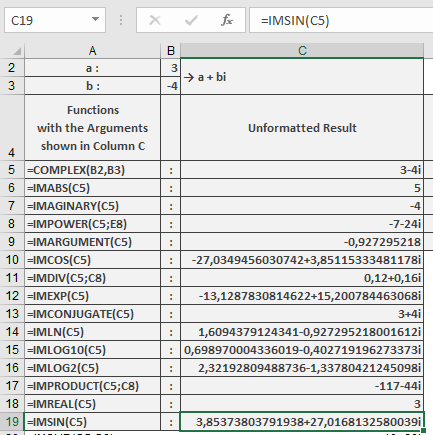
Example
=IMSIN(« 3-4i ») // Returns « 3.853738037+27.01681326i »
Additional Examples
=IMSIN(« 1+i ») // Returns « 1.298457581+0.634963914i »
=IMSIN(« 0+πi ») // Returns « 11.54873936i » (pure imaginary)
=IMSIN(« π/2-2i ») // Returns « 3.762195691-0.000000001i » (≈ cosh(2))
Key Features
- Maintains 9 decimal place precision
- Preserves input’s imaginary unit convention
- Periodic in real dimension (period 2π)
- Exponential growth/decay in imaginary dimension
Error Conditions
- Returns #NUM! for:
- Invalid complex number format
- Non-numeric components
- Missing imaginary unit when required