
Its converts an octal (base-8) number to its decimal (base-10) equivalent using two’s complement notation.
Syntax
OCT2DEC(number)
Argument
- number (required)
- Octal number to convert (10-digit maximum)
- Can be entered as text string or numeric value
- Valid range: 7777777000 (-536,870,912) to 7777777777 (-1) for negative values, 0 to 3777777777 (536,870,911) for positive values
Key Features
- Handles both positive and negative numbers via two’s complement
- No places parameter (unlike other conversion functions)
- Automatic sign detection based on most significant digit
- Truncates any fractional values
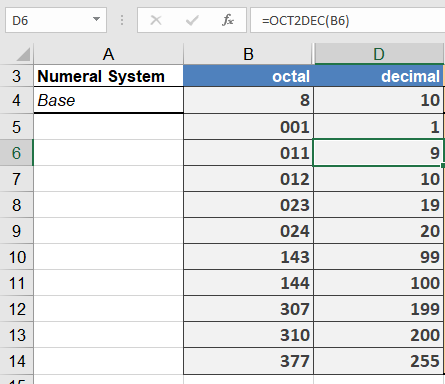
Examples
Common Applications
- Legacy system integration
- Unix/Linux permission analysis
- Digital signal processing
- Embedded systems debugging
Error Conditions
- Returns #NUM! when:
- Input exceeds 10 digits
- Value outside valid range
- Returns #VALUE! for:
- Non-octal characters (8-9, letters)
- Invalid number format