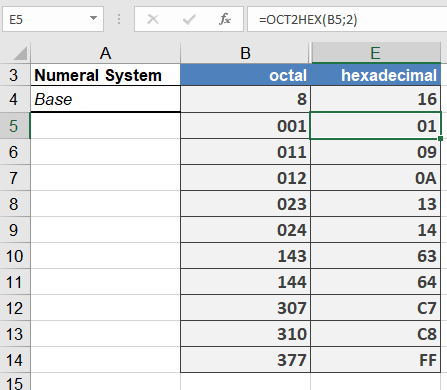
This function converts an octal number into a hexadecimal number.
Syntax
OCT2HEX(number; [places])
Arguments
- number(required)
The (at most) 10-digit octal number in two’s complement notation (see the section titled Two’s Complement) that is to be converted into a hexadecimal number. If number has a negative value, a 10-digit hexadecimal number is returned. - places(optional)
Determines how many digits are to be displayed, and is used to display leading zeros in the result. If the argument places is omitted, only the required number of digits is displayed. Possible decimal places after the decimal point are ignored.
Background
See the detailed description in the section titled Number Systems in the introduction to these functions (Number Systems).
Examples
The following examples illustrate OCT2HEX():