
The data type of a variable specifies the kind of data that the variable can store. You specify the data type of a variable by including the keyword As. The syntax is as follows:
Dim VariableName As Type
If no data type is specified, the default type is Variant. VBA supports the following data types for variables:
| Name | Type | Details |
|---|---|---|
| Byte | Numeric | Integer from 0 to 255. |
| Integer | Numeric | Integer from -32,768 to 32,767. |
| Long | Numeric | Integer from –2,147,483,648 to 2,147,483,647. |
| Currency | Numeric | Fixed-point number from –922,337,203,685,477.5808 to 922,337,203,685,477.5807 |
| Single | Numeric | –3.402823E38 to –1.401298E-45 (negative); 1.401298E–45 to 3.402823E38 (positive) |
| Double | Numeric | –1.79769313486232E308 to –4.94065645841247E-324 (negative); 4.94065645841247E-324 to 1.79769313486232E308 (positive) |
| String | Text | Text. |
| Date | Date | Date and time. |
| Boolean | Boolean | True or False. |
| Object | Object | Microsoft object. |
| Variant | All | Any data type (default if not declared). |
NOTE
When you find a statement in a VBA procedure that assigns a value to a variable, you can quickly locate the variable’s definition by selecting the variable name and pressing Shift+F2 or choosing View / Definition. Visual Basic jumps to the variable declaration line. Press Ctrl+Shift+F2 or choose View / Last Position to return to the previous cursor location.
Boolean Type
You can use the Boolean data type to store Boolean values. Boolean variables can only take two values: True or False. A Boolean variable occupies two bytes of space. The declaration is:
Dim ProductAvailable As Boolean
A Boolean variable, when converted to another type, returns -1 for True and 0 for False. When converting a numeric value to Boolean, 0 returns False and all other numbers return True.
Numeric Data Types
These types are used for mathematical operations such as addition, subtraction, multiplication, etc. For example: percentage calculation, stock price, fees, invoices, age, etc. In VBA, there are six numeric data types:
- Byte, Integer, and Long for integer values
- Single and Double for decimal values
- Currency for monetary values
NOTE
When you declare a variable as an integer type (e.g., Long) and assign it a decimal number, no error occurs, but only the integer part is retained.
More than a decade ago, memory optimization was important. Today, with increasingly powerful computers, such concerns are obsolete. You can use Long for all integers and Double for all decimals.
Date Type
You can use the Date data type to store a date. Each Date variable occupies eight bytes. The range for Date is from January 1, 0100 to December 31, 9999, and the time from 0:00:00 to 23:59:59.
Dates must be enclosed in hash signs (#) when assigned:
MyDate = #6/5/01#
MyDate = #June 6, 2001#
VBA converts the literal date into the mm/dd/yyyy format. You can also assign a time similarly.
Object Type
An object variable refers to an entire object, like a Range or Worksheet. These variables are important because:
- They simplify your code.
- They speed up execution.
The Object data type can hold references to any object. However, it’s preferable to declare variables as the specific object type they reference:
Dim GenericObj As Object
Dim SpecificObj As Worksheet
GenericObjcan reference any object.SpecificObjcan only reference aWorksheet.
Using Object is called late binding, meaning the object type isn’t known until runtime, which disables IntelliSense and slows performance slightly.
Using a specific type is called early binding, enabling IntelliSense and helping you write code faster.
Declaring a specific object type doesn’t initialize it. Example:
Dim mySheet As Worksheet
Set mySheet = Worksheets("Sheet6")
Use the Set keyword when assigning an object reference. You may also need to use the New keyword:
Set ObjectVar = New ObjectType
Dim ObjectVar As New ObjectType
Without Object Variable:
Sub NoObjectType()
    Worksheets("Sheet3").Range("C4").Value = "ELIE"
    Worksheets("Sheet3").Range("C4").Font.Size = 16
    Worksheets("Sheet3").Range("C4").Font.Name = "Verdana"
    Worksheets("Sheet3").Range("C4").Font.Bold = True
    Worksheets("Sheet3").Range("C4").Font.Italic = True
End Sub
With Object Variable:
Sub WithObjectType()
Dim myRange As Range Set
     myRange = Worksheets("Sheet6").Range("C4")
     myRange.Value = "ELIE"
     myRange.Font.Size = 16
     myRange.Font.Name = "Verdana"
     myRange.Font.Bold = True
     myRange.Font.Italic = True
End Sub
String Type
Use the String type when your variable holds text. Strings are enclosed in quotation marks.
Dim myVar As
String myVar = "This is a string"
By default, strings are variable-length. You can also declare fixed-length strings:
Dim myVar As String * 50
This sets the string length to exactly 50 characters. Extra characters are truncated; shorter strings are padded with spaces.
VBA supports only concatenation as a string operation, using & or +. Prefer & to avoid confusion:
Dim x As String
x = "Visual Basic " & "for Applications"
Variant Type
The Variant type is the default for undeclared variables. You can declare it explicitly:
Dim myVar As Variant
Variants can hold strings, dates, booleans, or numbers and automatically convert between types. Numeric variants need 16 bytes; string variants need 22 bytes plus character storage. Due to memory usage, prefer explicitly declaring types.
User-Defined Types (UDT)
A user-defined type (UDT) lets you group different data types into a single structure. You define it using the Type statement, usually at the top of the module:
Type ClientInfo
     Company As String
     Phone As Long
     City As String
     POBox As Long
     Income As Double
End Type
Declare an array of this type:
Dim Clients(1 To 20) As ClientInfo
Access individual fields:
Clients(5).Company = "CESTAD ANALYTICS"
Clients(5).Phone = 699072798
Clients(5).City = "Douala"
Clients(5).POBox = 15652
Clients(5).Income = 17598000
Limitations:
- Cannot instantiate dynamically.
- Cannot validate fields.
- UDTs are static structures.
Use classes to overcome these.
Identifying Variable Types
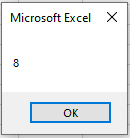
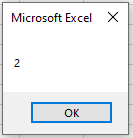
Use VarType() to determine the data type of a variable:
Sub TestVariables()
     firstName = "chancelin"
     MsgBox VarType(firstName)
     age = 33
     MsgBox VarType(age)
End Sub
Returns 8 (String), then 2 (Integer).
| Value Type | Return Value |
|---|---|
| Variant | 0 |
| Null | 1 |
| Integer | 2 |
| Long | 3 |
| Single | 4 |
| Double | 5 |
| Currency | 6 |
| Date/Time | 7 |
| String | 8 |
| Boolean | 11 |
| Byte | 17 |
If you perform math on a non-numeric Variant, you get a Type Mismatch error.
Functions to Test Variable Values
Numeric Value
Use IsNumeric() to test if a Variant holds a number:
Sub TestNumeric()
     name = "chancelin"
     MsgBox IsNumeric(name)
End Sub
Returns False.
Date/Time Values
Date/time values are floating-point numbers. The integer part represents days since Dec 31, 1899; the decimal part represents time.
Example: 37786.75 = June 14, 2003, at 6:00 PM.
Use IsDate() to check for a date:
Sub TestDate()
    myDate = "01-Feb-2002"
    MsgBox IsDate(myDate)
End Sub
Returns True.
Empty Value
Use IsEmpty() to check if no value has been assigned:
MsgBox IsEmpty(MyTest)
Returns True.
Null Value
A Variant can contain a special value Null, representing unknown or missing data. Use IsNull() to test for it.
Return Values
The table below lists constants returned by VarType():
| Constant | Value | Description |
|---|---|---|
| vbEmpty | 0 | Variable is uninitialized. |
| vbNull | 1 | No valid data. |
| vbInteger | 2 | Integer |
| vbLong | 3 | Long integer |
| vbSingle | 4 | Single |
| vbDouble | 5 | Double |
| vbCurrency | 6 | Currency |
| vbDate | 7 | Date |
| vbString | 8 | String |
| vbObject | 9 | Object reference |
| vbError | 10 | Error code |
| vbBoolean | 11 | Boolean |
| vbVariant | 12 | Variant (only for arrays of variants) |
| vbDataObject | 13 | Non-ActiveX object reference |
| vbDecimal | 14 | 96-bit scaled real |
| vbByte | 17 | Byte |
| vbLongLong | 20 | LongLong (64-bit only) |
| vbUserDefinedType | 36 | User-defined type |
| vbArray | 8192 | Array value |
Shorter Variable Declarations
Advanced programmers may use abbreviations:
| Detailed | Shorthand |
|---|---|
Dim Client As Integer |
Dim Client% |
Dim MainClient As Long |
Dim MainClient& |
Dim Amount As Currency |
Dim Amount@ |
Dim ClientInfo As String |
Dim ClientInfo$ |
You can also use naming conventions to suggest data type, e.g.:
str_messagefor a stringi_SalesJanuaryfor an integer