
The Label control is used to display information or captions. The user cannot modify the text displayed in the caption during program execution. The main property of the Label is the Caption property, which defines the text that is displayed.
A label does not display values from data sources or expressions; it is always unbound and does not change when you move from one record to another.
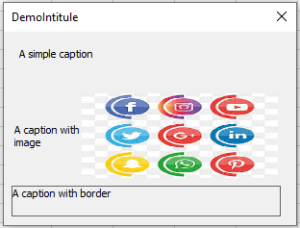
The following example shows different types of Labels: simple, with an image, and with a border. To implement this project, create a form in which you place three Labels. The image file D:\chiennoir.jpg is used. In the form module, type the following code:
Private Sub UserForm_Initialize()
   Me.Caption = "DemoLabel"
   Label1.Caption = "A simple caption"
   Label2.Caption = "A caption with image"
   Label2.Picture = LoadPicture("logo.jpg")
   Label2.PicturePosition = fmPicturePositionRightCenter
   Label3.Caption = "A caption with border"
   Label3.BorderStyle = fmBorderStyleSingle
   Label3.WordWrap = True
End Sub
Comments
■ In the Property window of Label2, the image is loaded using the Picture property. The PicturePosition property determines the relative position of the image and the text.
■ In the Property window of Label3, the BorderStyle property defines whether the text box is displayed with or without a border.
■ The WordWrap property returns or sets a Boolean value that specifies whether the contents of a control automatically wrap at the end of a line, or whether the control expands to fit the text size.