
The goal is to create a system that incorporates advanced inventory control techniques such as:
- Economic Order Quantity (EOQ) – Determines the optimal order quantity.
- Reorder Point (ROP) – When to place a new order to avoid stockouts.
- Safety Stock – Additional stock to prevent stockouts during demand fluctuations.
- Lead Time Demand – Calculating expected demand during lead time.
Step-by-Step Explanation:
- Economic Order Quantity (EOQ)
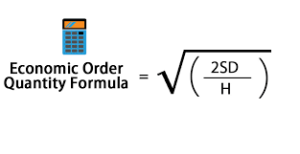
The EOQ formula helps us find the optimal order quantity that minimizes total inventory costs (order cost + holding cost). The formula is:
- Reorder Point (ROP)
The Reorder Point tells us when to place a new order. It depends on the lead time (time taken from placing an order to receiving it) and the average demand during this lead time.
ROP=Lead Time Demand=Lead Time×Average Demand per DayROP
3. Safety Stock
Safety Stock is an additional quantity of inventory kept to prevent stockouts due to variability in demand or lead time.
SS=Z×σL×LTSS
Where:
- Z= Service factor (based on the desired service level)
- σL = Standard deviation of demand during lead time
- LT = Lead time
- Lead Time Demand (LTD)
Lead Time Demand (LTD) is the expected demand during the lead time. This helps in predicting how much inventory will be consumed during the lead time before the next order arrives.
Excel VBA Code Implementation:
Below is an Excel VBA implementation for these advanced inventory control algorithms:
Sub AdvancedInventoryControl()
    ' Define variables for EOQ, ROP, Safety Stock, and Lead Time Demand calculations
    Dim demand As Double, orderCost As Double, holdingCost As Double
    Dim leadTime As Double, averageDemand As Double
    Dim zValue As Double, sigmaL As Double, LT As Double
    Dim eoq As Double, rop As Double, safetyStock As Double, ltd As Double
    Dim serviceLevel As Double
    ' Input values for the model (these can be replaced by cell references if needed)
    demand = 12000 ' Annual Demand (units per year)
    orderCost = 100 ' Ordering cost (per order)
    holdingCost = 5 ' Holding cost (per unit per year)
    leadTime = 7 ' Lead time (in days)
    averageDemand = 30 ' Average daily demand (units)
    ' Safety Stock parameters
    serviceLevel = 0.95 ' Desired service level (95% service level corresponds to Z=1.645)
    zValue = Application.WorksheetFunction.NormSInv(serviceLevel) ' Z value for service level
    ' Standard deviation of demand during lead time (use historical data or estimation)
    sigmaL = 10 ' Standard deviation of demand during lead time
    LT = leadTime ' Lead time in days
    ' Calculate EOQ (Economic Order Quantity)
    eoq = Sqr((2 * demand * orderCost) / holdingCost)
    ' Calculate Reorder Point (ROP)
    rop = leadTime * averageDemand
    ' Calculate Safety Stock
    safetyStock = zValue * sigmaL * Sqr(LT)
    ' Calculate Lead Time Demand (LTD)
    ltd = leadTime * averageDemand
    ' Output results to Excel sheet (or directly to the Immediate Window for debugging)
    Debug.Print "Economic Order Quantity (EOQ): " & eoq
    Debug.Print "Reorder Point (ROP): " & ro
    Debug.Print "Safety Stock: " & safetyStock
    Debug.Print "Lead Time Demand (LTD): " & ltd
    ' Optionally, output the results in specific cells (you can adjust the cell references)
    Range("B1").Value = "Economic Order Quantity (EOQ)"
    Range("B2").Value = eoq
    Range("B3").Value = "Reorder Point (ROP)"
    Range("B4").Value = ro
    Range("B5").Value = "Safety Stock"
    Range("B6").Value = safetyStock
    Range("B7").Value = "Lead Time Demand (LTD)"
    Range("B8").Value = ltd
End Sub
Explanation of the Code:
- Variable Declaration:
- Variables are declared for each of the parameters: demand, order cost, holding cost, etc. These can be replaced by cell references if you want to pull them directly from an Excel sheet.
- EOQ Calculation:
- The formula for EOQ is applied to calculate the optimal order quantity.
- ROP Calculation:
- The reorder point is calculated by multiplying the lead time by the average demand per day.
- Safety Stock Calculation:
- The safety stock is calculated using the Z-score for the desired service level and the standard deviation of demand during the lead time.
- LTD Calculation:
- Lead Time Demand is calculated simply by multiplying the average daily demand by the lead time (in days).
- Output:
- Results are output to the Immediate Window for debugging and also placed in the Excel worksheet cells for easy reference.
How to Use:
- Input Data:
- You can adjust the input values for demand, order cost, holding cost, lead time, and average demand. These values can also be linked to specific cells in an Excel sheet.
- Run the Code:
- Press Alt + F11 to open the VBA editor in Excel, then paste this code into a new module.
- You can run the AdvancedInventoryControl subroutine directly or link it to a button in your Excel sheet.
- View Results:
- The results will be displayed in the Immediate Window (for debugging) and in the Excel cells, where you can easily review the EOQ, ROP, Safety Stock, and Lead Time Demand values.
Additional Enhancements:
- Dynamic Inputs: You can set up user forms or links to cells where users can input values like demand, lead time, etc., and dynamically calculate the results.
- Inventory Tracking: You could integrate a system to track inventory levels and automatically alert when the reorder point is reached or if stock levels fall below the safety stock.
- Multiple Items: This algorithm can be expanded to work for multiple products by looping through different items and their respective inputs.
This script provides a foundational approach to implementing advanced inventory control algorithms in Excel VBA, and you can build on it depending on your specific needs and data complexity.