
The PV function, which stands for Present Value, is designed to calculate the present value of an investment or loan based on a constant interest rate. It can be applied to scenarios involving periodic, constant payments, such as mortgages or other loans, or to determine the present value of a future investment goal.
The PV function uses the following syntax for its calculations:
=PV(rate, nper, pmt, [fv], [type])
– Rate (Required Argument): This represents the interest rate per compounding period. For example, a loan with a 14% annual interest rate and monthly payments would have a monthly interest rate of 1.2% (i.e., 14/12 = 1.2%).
– Nper (Required Argument): This is the total number of payment periods required to repay the loan. For instance, a 4-year loan with monthly payments would have 48 payment periods (4 x 12).
– Pmt (Required Argument): This is the fixed payment amount made each period, which remains constant throughout the investment or loan term.
– Fv (Optional Argument): This refers to the future value of the investment at the end of the payment period. If no value is provided, Excel defaults this to 0.
– Type (Optional Argument): This indicates whether payments are made at the beginning or end of the period. Entering 0 means payments are due at the end of the period, while 1 means payments are due at the beginning.
USING THE PV FUNCTION
Consider the example of an annuity that makes periodic payments of $500,00 with an annual interest rate of 3,5%. The annuity makes monthly payments over a period of 6 years. To calculate the present value using the PV function, follow these steps:
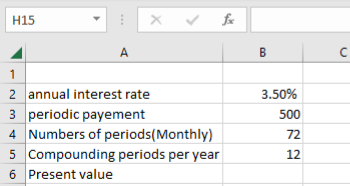
To find the present value of the table above using the PV function
- Select an empty cell and enter the function with its arguments:
=PV(B2/B5, B4, B3, 0, 0)
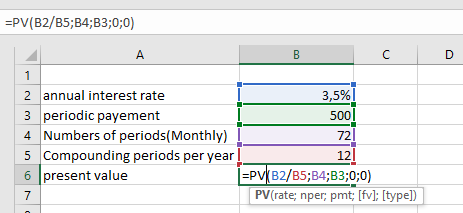
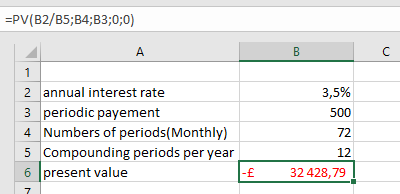
- Press **Enter**, and the present value will be calculated. In this example, the present value is **-£32 428,79**, as shown in the table below.
IMPORTANT NOTES WHEN USING THE PV FUNCTION
– If non-numeric arguments are provided, the PV function will return a `#VALUE!` error.
– The annual interest rate cannot be automatically converted to a periodic rate within the PV function. You must manually convert it before using the function