
The FV function is designed to calculate the future value of an investment or loan based on periodic, constant payments and a constant interest rate. It is commonly used to determine the value of an investment or loan at a future point in time.
The FV function uses the following syntax for its calculations:
=FV(rate, nper, pmt, [pv], [type])
- Rate (Required Argument): This is the interest rate per compounding period.
- Nper (Required Argument): This represents the total number of payment periods over the lifetime of the investment or loan.
- Pmt (Optional Argument): This indicates the payment made each period. If this argument is omitted, the pv (present value) argument must be provided.
- Pv (Optional Argument): This represents the present value of the investment or loan. If this argument is omitted, the pmt (payment) argument must be provided.
- Type (Optional Argument): This specifies whether payments are made at the beginning or end of the period. Entering 0 means payments are due at the end of the period, while 1 means payments are due at the beginning.
USING THE FV FUNCTION
Using the information in the table below, let’s calculate the future value with the FV function:
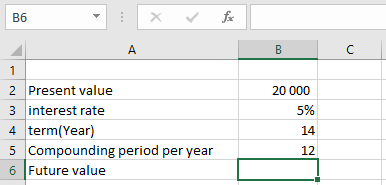
To find the future value of the table above using the FV function
- Select an empty cell and enter the function with its arguments:
=FV(B3/B5, B4*B5, 0, -B2)
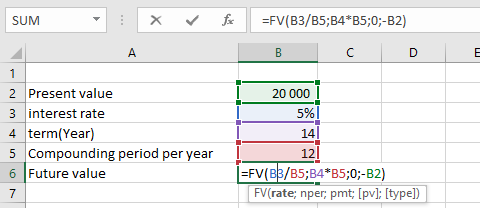
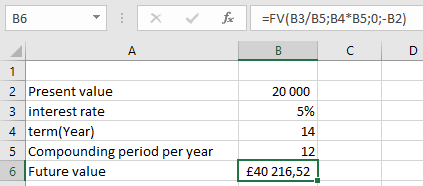
- Press Enter, and the future value will be calculated. In this example, the future value is £40 216,52, as shown in the table below.
IMPORTANT NOTES WHEN USING THE FV FUNCTION
- If non-numeric arguments are provided, the FV function will return a #VALUE! error.
- The payment value (pmt) will appear as a negative number when it represents cash going out of a business (e.g., loan payments or investments).