
The MOD function returns the remainder after dividing one number (dividend) by another (divisor).
The MOD function uses these arguments:
=MOD(number, divisor)
Number (Required): The dividend (number to be divided)
Divisor (Required): The number to divide by
USING THE MOD FUNCTION
Let’s find the remainder of dividing cell A2 by B2 in the table below:
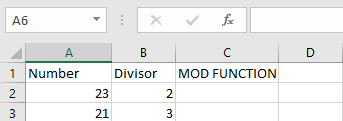
- Select an empty cell
- Enter the formula:
=MOD(A2, B2)- A2 contains the dividend
- B2 contains the divisor
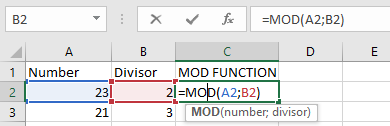
- The result will display in the selected cell
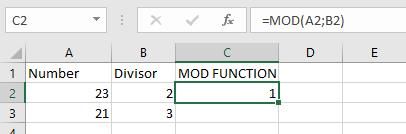
IMPORTANT NOTES
- #DIV/0! error occurs when:
- The divisor is zero
- The result will have:
- The same sign (+/-) as the divisor