
The FORMULATEXT function displays the formula contained in a specified cell as a text string. This function was introduced in Microsoft Excel 2013.
Syntax:
=FORMULATEXT(reference)
Argument:
- reference (Required):
The cell reference containing the formula you want to display as text.
USING THE FORMULATEXT FUNCTION
Example: Display a Cell’s Formula
Given a cell (B7) containing a formula to calculate Joy’s mathematics score:
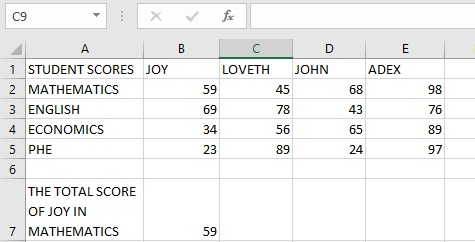
Steps to Display the Formula:
- Select an empty cell type in the function =FORMULATEXT
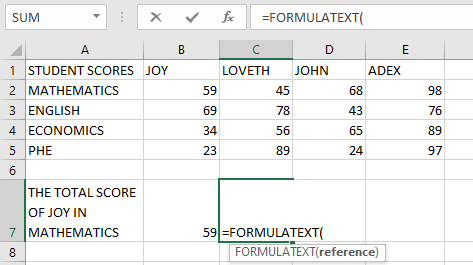
- Enter the function:
=FORMULATEXT(B7)
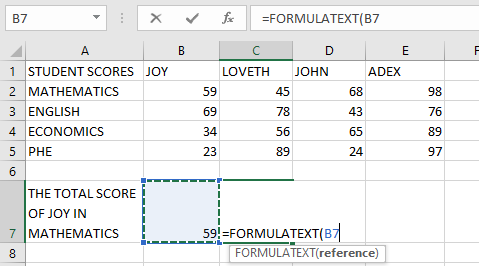
- Press Enter
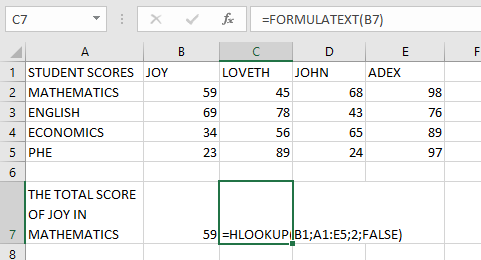
Result:
The actual formula from cell B7 will be displayed as text in the selected cell.
ERRORS & IMPORTANT NOTES
Common Errors:
- #VALUE! Error:
Occurs when invalid data types are used as inputs. - #N/A Error:
Occurs when:- The referenced cell doesn’t contain a formula
- Referencing a closed workbook
- The formula exceeds 8192 characters
- The worksheet is protected
Key Points:
- Only displays formulas – won’t show values or text
- Particularly useful for:
- Documenting complex spreadsheets
- Troubleshooting formulas
- Auditing workbook calculations