
The AND function is a logical function that checks whether all specified conditions in a dataset are TRUE. If any condition fails, it returns FALSE. For example, checking if B1 is greater than 50 AND less than 100.
The AND function uses the following syntax:
=AND(logical1; [logical2]; …)
Arguments:
- Logical1 (Required): The first condition to evaluate
- Logical2 (Optional): The second condition to evaluate
(Up to 255 conditions can be tested)
USING THE AND FUNCTION
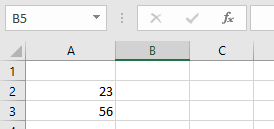
Using the table below, let’s test if cell A2 is greater than 67 AND less than cell A3:
To perform this check:
- Select an empty cell
- Enter the formula:
=AND(A2>6; A2<A3)
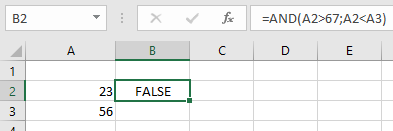
In this example:
- The function returns FALSE because one condition fails (A2 is not greater than 67)
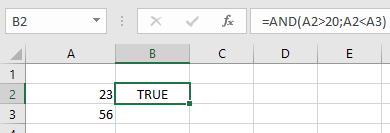
- If all conditions were met, it would return TRUE
IMPORTANT NOTES ABOUT THE AND FUNCTION
- Returns #VALUE! error if no logical values are provided
- Ignores text values and empty cells in its arguments
- Can test up to 255 different conditions
- Only returns TRUE when ALL conditions are satisfied
- Returns FALSE if any single condition fails
- Commonly used with other functions like IF to create more complex logical tests
The AND function provides a simple way to verify multiple conditions simultaneously in your data analysis.