
The EDATE function is use to Returns the serial number of the date that is a specified number of months before or after a given start date.
Syntax
EDATE(start_date, months)
Arguments
- start_date (required): The initial date for the calculation.
- months (required): The number of months to add (positive) or subtract (negative).
Background
- Calculates future or past dates by adding/subtracting months while preserving the day value (unless invalid for the new month).
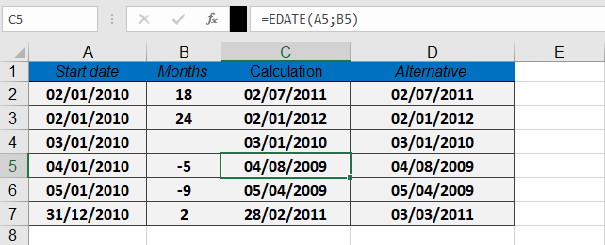
- Alternative method using DATE(), YEAR(), MONTH(), and DAY():
=DATE(YEAR(start_date), MONTH(start_date) + months, DAY(start_date))
- Errors:
- #VALUE! if start_date is invalid.
- Non-integer months are truncated (e.g., 3.9 becomes 3).
Examples
Assume that you want to calculate the end of months of 4 construction project. The formula given bellow;
| Formula | Result | Notes |
| =EDATE(« 01/02/2010 », 18) | 07/02/2011 | 18 months later |
| =EDATE(« 01/02/2010 », 24) | 01/02/2012 | 2 years later (24 months) |
| =EDATE(« 01/03/2010 », 0) | 01/03/2010 | Same date (months=0) |
| =EDATE(« 01/04/2010 », -5) | 08/04/2009 | 5 months earlier |
Key Notes
- Day Adjustment: If the resulting month has fewer days (e.g., =EDATE(« 31/01/2023 », 1)), Excel returns the last valid day (February 28 or 29).
- Formatting: Apply date formatting to display the serial number as a readable date.