
Its returns the serial number representing the last day of the month, calculated as a specified number of months before or after a given start date;
Syntax
EOMONTH(start_date, months)
Arguments
- start_date (required):
- The initial date for calculation
- Can be a date string, serial number, or reference to a cell containing a date
- months (required):
- Integer value specifying the number of months to add (positive) or subtract (negative)
- Decimal values are truncated (e.g., 2.9 becomes 2)
Background
Primarily used in financial applications for:
- Calculating payment due dates
- Determining maturity dates
- Setting month-end reporting periods
Alternative Calculation Method:
=DATE(YEAR(start_date), MONTH(start_date) + months + 1, 1) – 1
This formula:
- Advances to the first day of the month after the target month
- Subtracts one day to get the last day of the target month
Error Handling
- Returns #NUM! error if:
- start_date is invalid or text-formatted
- Resulting date falls outside Excel’s valid date range (1/1/1900 to 12/31/9999 for Windows)
Examples
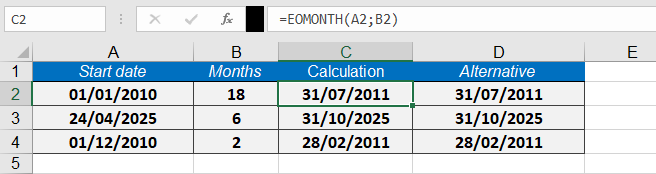
Assume that you want to designate the last day of the month as the due date for a credit period 18 months from January 1, 2010. The formula
=EOMONTH(« 01/01/2010 »,18)
returns 07/31/2011 as the due date as seen bellow
This function is particularly valuable for financial professionals who need to calculate precise month-end dates for various accounting and reporting purposes.