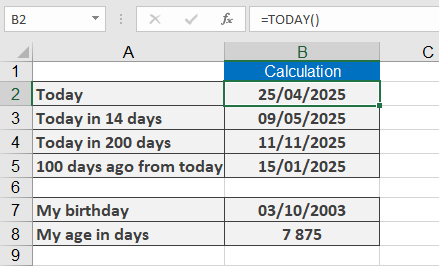
This function returns the serial number corresponding to the current date.
Syntax:
TODAY()
Background:
The TODAY() function retrieves the current date without including the time. If the cell is formatted as General before entering the function, the result will display as a date.
The related NOW() function returns both the current date and time, whereas TODAY() provides only the date.
Use TODAY() to calculate date differences from the current date. For example, you can determine how many days have passed since an invoice was issued, helping track deadlines.
Results update when:
- The workbook is opened
- A manual recalculation is triggered (press F9 to refresh)
Note: The function’s accuracy relies on your system’s correct date and time settings.
Example:
To insert the current date in an invoice form, use:
=TODAY()
Additional examples:
- =TODAY()+14 → Returns the date 14 days from today.
- =TODAY()+200 → Returns the date 200 days from today.
- =TODAY()-100 → Returns the date 100 days before today.
- =TODAY()-« 11/14/1959 » → Calculates a person’s age in days if their birthdate is November 14, 1959.