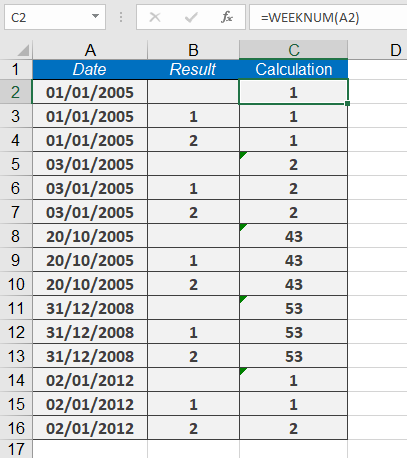
This function returns the week number (as an integer) for a given date.
Syntax:
WEEKNUM(serial_number, [return_type])
Arguments:
- serial_number (required): The date for which to calculate the week number.
- return_type (optional): A number specifying the week numbering system and starting day.
Options in Excel :
-
- 1 (System 1, default): Week begins on Sunday (days numbered 1–7, Sunday=1).
- 2 (System 2): Week begins on Monday (days numbered 1–7, Monday=1).
Additional options in Excel :
-
- 1: Week begins on Sunday (default).
- 2: Week begins on Monday.
- 11: Week begins on Monday.
- 12: Week begins on Tuesday.
- 13: Week begins on Wednesday.
- 14: Week begins on Thursday.
- 15: Week begins on Friday.
- 16: Week begins on Saturday.
- 17: Week begins on Sunday.
- 21 (System 2, ISO 8601): Week begins on Monday.
Background:
- System 1: Week 1 is the week containing January 1.
- System 2 (ISO 8601): Week 1 is the week with the year’s first Thursday (European standard).
- System 2 aligns with ISO 8601 (1988), where weeks start on Monday.
Example:
How to display week numbers in an operations schedule:
=WEEKNUM(date)