
This function calculates the fraction of a year between two dates, useful for financial calculations and comparisons.
Syntax:
YEARFRAC(start_date, end_date, [basis])
Arguments:
- start_date (required): The beginning date of the period
- end_date (required): The ending date of the period
- basis (optional): The day count convention method:
- 0 or omitted: US (NASD) 30/360
- 1: Actual/Actual
- 2: Actual/360
- 3: Actual/365
- 4: European 30/360
Background:
The YEARFRAC() function is particularly valuable for:
- Financial analysis and interest calculations
- Comparing durations of investments or liabilities
- Age calculations with fractional years
Important notes:
- All date arguments are truncated to integers (decimal portions removed)
- Returns #VALUE! if either date is invalid
- Returns #NUM! if basis is <0 or >4
Examples:
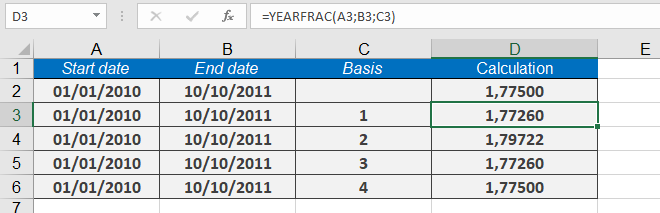
- Basic calculation (US 30/360 basis):
=YEARFRAC(« 01/01/2008 », « 10/10/2009 ») → Returns 775 - Different basis methods:
- =YEARFRAC(« 01/01/2010 », « 10/10/2011 », 1) → 77260(Actual/Actual)
- =YEARFRAC(« 01/01/2010 », « 10/10/2011 », 2) → 79722(Actual/360)
- =YEARFRAC(« 01/01/2010 », « 10/10/2011 », 3) → 77260(Actual/365)
- =YEARFRAC(« 01/01/2010 », « 10/10/2011 », 4) → 77500(European 30/360)
Common Uses:
- Calculating prorated interest payments
- Determining fractional periods for depreciation
- Comparing investment durations