
Identifying the Active Workbook
The following VBA procedure demonstrates how to determine the name of the active workbook in two different situations:
Sub IdentifyActiveWorkbook()
    Workbooks.Open "C:\Users\MAC 2015\Desktop\Titanic-Dataset.csv"
    MsgBox "Active after opening: " & ActiveWorkbook.Name
    ActiveWorkbook.Close
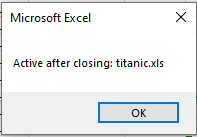
    MsgBox "Active after closing: " & ActiveWorkbook.Name
End Sub
Explanation:
This procedure begins by opening an additional workbook from a specified file path. It assumes that the file « C:\Temp\Mappe1.xlsm » exists and can be opened without error.
The keyword ActiveWorkbook refers to the workbook that is currently in focus—the one the user is interacting with or the one that has been programmatically activated. In Excel, any workbook that is just opened automatically becomes the active workbook.
To verify this behavior, the name of the active workbook is displayed using MsgBox() immediately after opening the file.
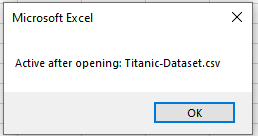
Next, the Close() method is called on the ActiveWorkbook object, which closes the workbook that was just opened. Once it is closed, Excel automatically reactivates the workbook that was active before the new one was opened.
To verify the change, the procedure again displays the name of the currently active workbook using MsgBox().
Additional Tip:
If you want to close a specific workbook by its name rather than using ActiveWorkbook, you can write:
Workbooks(« Titanic-Dataset.csv »).Close