
Formatting Individual Characters in a Cell with VBA
The following VBA procedure shows how to apply formatting to specific characters within a text string in Excel cells. This allows you to format subscripts, superscripts, or apply styles like bold or italic to only a part of the text in a cell—useful for scientific notation, equations, or special symbols.
VBA Example: Superscript and Subscript Formatting
Sub FormatIndividualCharacters()
    ThisWorkbook.Worksheets("Sheet2").Activate
    ' Add text to cells
    Range("E2").Value = "x2"
    Range("E3").Value = "x3"
    ' Superscript the second character (the number) in both cells
    Range("E2:E3").Characters(2, 1).Font.Superscript = True
    ' Add text to more cells
    Range("E4:E6").Value = "a38 + a39"
    ' Subscript "38" and "39" in all three cells
    Range("E4:E6").Characters(2, 2).Font.Subscript = True     ' Formats "38"
    Range("E4:E6").Characters(8, 2).Font.Subscript = True     ' Formats "39"
End Sub
Explanation of the Procedure:
Activate the Worksheet:
Ensures that « Sheet2 » is selected before applying changes.
Adding Content to Cells:
Range(« E2 »).Value = « x2 »
Range(« E3 »).Value = « x3 »
-
- Two cells are filled with simple expressions (x2, x3).
Formatting with .Characters(start, length):
Range(« E2:E3 »).Characters(2, 1).Font.Superscript = True
-
- This line targets the second character of the string (the number 2 or 3) in cells E2 and E3, and applies superscript formatting to it.
- The syntax .Characters(start, length) allows you to select part of the string:
- start: the position where formatting begins (1-based index)
- length: how many characters to format
Working with Subscript Formatting:
Range(« E4:E6 »).Value = « a38 + a39 »
Range(« E4:E6 »).Characters(2, 2).Font.Subscript = True ‘ Targets « 38 »
Range(« E4:E6 »).Characters(8, 2).Font.Subscript = True ‘ Targets « 39 »
-
- Each of the cells E4 to E6 contains the text a38 + a39.
- The two-character substrings « 38 » and « 39 » are subscripted by accessing:
- Position 2, length 2 → « 38 »
- Position 8, length 2 → « 39 »
Visual Outcome :
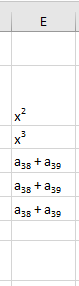
- E2 displays: x²
- E3 displays: x³
- E4 to E6 display: a₃₈ + a₃₉
Superscript is used for exponents, and subscript is used for variable indices—commonly seen in scientific and mathematical notation.
Key Concepts Recap:
| Element | Purpose |
| .Characters(start, length) | Selects a part of the cell’s text |
| .Font.Superscript = True | Applies superscript to selected characters |
| .Font.Subscript = True | Applies subscript to selected characters |
This technique allows precise formatting within cells—ideal for chemical formulas, math expressions, and technical documentation.