Logical operators are used to combine multiple conditions. Lists the most important logical operators:
| Operator | Description | Result is True when… |
| Not | Not | … the expression is False |
| And | And | … both expressions are True |
| Or | Inclusive Or | … at least one expression is True |
| Xor | Exclusive Or | … exactly one expression is True |
Given the variables a = 1, b = 3, and c = 5, observe the results in Table 3.10:
| Expression | Result |
| Not (a < b) | False |
| (b > a) And (c > b) | True |
| (b < a) Or (c < b) | False |
| (b < a) Xor (c > b) | True |
Shows the truth tables of these logical operators, where Expression 1 and Expression 2 can each be True or False:
| Expr1 | Expr2 | Not Expr1 | Expr1 And Expr2 | Expr1 Or Expr2 | Expr1 Xor Expr2 |
| True | True | False | True | True | False |
| True | False | False | False | True | True |
| False | True | True | False | True | True |
| False | False | True | False | False | False |
Note: The Not operator only applies to Expression 1.
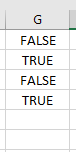
Example Procedure Using Logical Operators:
Sub LogicalOperators()
    Dim a As Integer, b As Integer, c As Integer
    a = 1
    b = 3
    c = 5
    ThisWorkbook.Worksheets("Sheet1").Activate
    Range("G1").Value = Not (a < b)
    Range("G2").Value = (b > a) And (c > b)
    Range("G3").Value = (b < a) Or (c < b)
    Range("G4").Value = (b < a) Xor (c > b)
End Sub