
For simple decisions involving single statements, the single-line If is suitable. However, as soon as multiple statements need to be executed, the code can quickly become confusing. For this purpose, an If-Then-Else block is much better suited.
The structure of the block is as follows:
If condition1 Then
    statements1
[ ElseIf condition2 Then
    statements2 ]
...
[ Else
    statementsX ]
End If
The program branches to the statements following the first true condition (ElseIf). If none of the conditions is true and an Else branch exists, the statements in the Else branch are executed. Otherwise, no statement is executed.
An If-Then-Else block always ends with an End If.
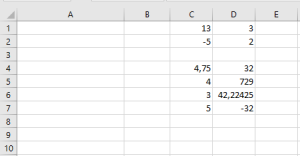
The following procedure tests two different cases. If neither applies, the Else branch is executed:
Sub BlockIf()
    ThisWorkbook.Worksheets("Sheet1").Activate
    If Range("C1").Value > 100 Then
        Range("C1").Font.Size = 14
        Range("C1").Font.Italic = True
        Range("C1").Font.Underline = True
    ElseIf Range("C1").Value < 10 Then
        Range("C1").Font.Size = 11
        Range("C1").Font.Italic = False
        Range("C1").Font.Underline = False
    Else
        Range("C1").Font.Size = 17
        Range("C1").Font.Italic = False
        Range("C1").Font.Underline = True
    End If
End Sub

Explanation:
Depending on the value in the cell, the font properties size, italic, and underline are set accordingly.
In the current case, the value is neither greater than 100 nor less than 10, so the third case (Else) applies.