
Normally, the number and order of parameters in a procedure or function call must exactly match the declaration. However, optional parameters allow you to omit arguments when calling the procedure or function.
- Optional parameters are marked with the keyword Optional in the parameter list.
- They must always be at the end of the parameter list.
- Optional parameters can be assigned a default value.
Example:
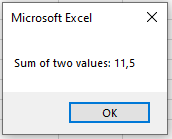
The function AddNumbers() is called three times:
- once with four parameters,
- once with three parameters,
- and once with two parameters.
It calculates the sum of the passed parameters and returns the result.
Sub OptionalParametersExample()
    Dim a As Double, b As Double, c As Double, d As Double
    a = 4
    b = 7.5
    c = 10.5
    d = 9
    MsgBox "Sum of four values: " & AddNumbers(a, b, c, d)
    MsgBox "Sum of three values: " & AddNumbers(a, b, c)
    MsgBox "Sum of two values: " & AddNumbers(a, b)
    ' MsgBox "Sum of one value: " & AddNumbers(a)  ' This would cause an error
End Sub
Function AddNumbers(x As Double, y As Double, Optional z As Double = 0, Optional q As Double = 0) As Double
    AddNumbers = x + y + z + q
End Function


Explanation:
- The function AddNumbers() expects four parameters of type Double.
- The last two parameters (z and q) are optional with default values of 0.
- When the function is called with fewer than four arguments, the missing optional parameters take the default value 0.
- This ensures the sum calculation is correct without needing all parameters.
- Calling the function with only one parameter would cause an error because y is not optional.
Error Example:
If you attempt to call the function with only one parameter, VBA will generate an error similar to:
« At least two parameters are required. »
