
A user-defined data type lets you combine related data of different types into a single structure, clarifying their thematic connection. It’s similar to a struct in other programming languages.
Key Features
- Components of a UDT can themselves be arrays.
- You can create variables and arrays of your new type.
- Variables of the UDT can be passed as parameters to procedures or functions.
- UDTs are declared at the module level (outside procedures), typically at the top, right under Option Explicit.
Example
Option Explicit
Type Person
    Name As String
    PNummer As Integer
    Telefon() As String        ' Dynamic array of phone numbers
    Telefax(1 To 2) As String ' Fixed array with 2 elements
    Gehalt As Single
End Type

Sub Benutzerdefiniert()
    ' Declare a single variable and an array of the user-defined type
    Dim S As Person
    Dim T(1 To 5) As Person
    ' Assign values to the components of the variable S
    S.Name = "Maier"
    S.PNummer = 17
    S.Telefax(1) = "0965-347767"
    S.Telefax(2) = "0975-227134"
    S.Gehalt = 2652.5
    ' Dimension the dynamic array before assigning values
    ReDim S.Telefon(1 To 3)
    S.Telefon(1) = "0965-347766"
    S.Telefon(2) = "0189-938439"
    S.Telefon(3) = "0975-227133"
    ' Assign the variable S to the 5th element of the array T
    T(5) = S
    ' Output elements of the user-defined variable
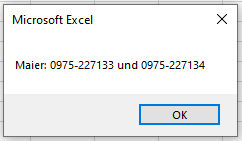
    MsgBox T(5).Name & ": " & T(5).Telefon(3) & " und " & T(5).Telefax(2)
    ' Pass the variable to a procedure
    BDTypAusgabe T(5)
    ' Note: Outputting the entire UDT directly is not possible
    ' MsgBox T(1).Name would show empty because T(1) was not assigned
End Sub

Sub BDTypAusgabe(x As Person)
    MsgBox x.Name & ": " & x.Telefon(3) & " und " & x.Telefax(2)
End Sub
Explanation
- The UDT Person has five components:
- Name: String
- PNummer: Integer
- Telefon(): Dynamic array of Strings
- Telefax(1 To 2): Fixed-size array of two Strings
- Gehalt: Single (decimal number)
- Before assigning values to the dynamic array component (Telefon), it must be dimensioned with ReDim.
- Assigning one variable of type Person to another copies all components, including arrays.
- You cannot output a variable of the entire user-defined type directly (e.g., MsgBox T(5)); instead, you output individual components explicitly.
- User-defined types declared without Private are project-wide, meaning all modules can see them. Use Private Type to restrict visibility to the declaring module.
Summary
User-defined data types allow you to group related, different kinds of data into meaningful units for clearer and better-structured code. This is especially useful when working with complex data sets or when passing related information as a single variable.