
You can assign object variables step-by-step following the object hierarchy. This approach makes your code clearer and easier to maintain, especially when working with multiple objects located at different levels within the hierarchy.
Here is an example:
Sub HierarchicalObjectVariableAssignment()
    Dim WS As Worksheet
    Dim Rg1 As Range, Rg2 As Range
    Set WS = ThisWorkbook.Worksheets("Sheet1")
    Set Rg1 = WS.Range("C1:C2")
    Set Rg2 = WS.Range("D1:D2")
    Rg1.Value = 1.7
    Rg2.Value = 3.4
    Set Rg1 = Nothing
    Set Rg2 = Nothing
    Set WS = Nothing
End Sub
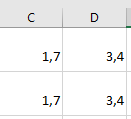
Explanation:
- First, the variable WS is assigned as a reference to the worksheet named « Sheet1 ».
- Then, the variables Rg1 and Rg2 are assigned as references to different ranges within that worksheet.
- This hierarchical assignment avoids repeatedly typing the full path and helps organize code logically.
- After modifying the range values, the object variables are set to Nothing to release the references.