
First, the code example:
Sub MsgBoxOkOnly()
    MsgBox "Read? Then please press OK", vbOKOnly, "OK"
End Sub
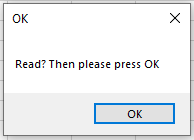
Explanation:
The first parameter is the message text displayed in the message box, which you are already familiar with.
The second parameter is optional and controls the appearance and behavior of the dialog box. In this example, the constant vbOKOnly is used to display only the OK button — this is also the default setting.
The third parameter is also optional and specifies the title of the dialog box window. If omitted, the title defaults to the name of the application.