
The following example shows a message box with Yes, No, and Cancel buttons — this time, the second button (No) is set as the default, as shown in Figure.
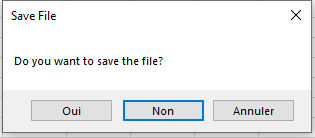
The corresponding code is:
Sub MsgBoxYesNoCancel()
    Dim response As Integer
    response = MsgBox("Do you want to save the file?", _
                      vbYesNoCancel Or vbDefaultButton2, "Save File")
    If response = vbYes Then
        MsgBox "You chose to save the file"
    ElseIf response = vbNo Then
        MsgBox "You chose not to save the file"
    Else
        MsgBox "You chose to cancel the operation"
    End If
End Sub
Explanation:
The three buttons Yes, No, and Cancel are combined with the vbDefaultButton2 behavior. If the user presses the Enter key, this corresponds to selecting the second button, which is No in this case.
Because the user has three choices, the response must be stored in a variable. The response is then evaluated using a multiple-branch conditional structure to execute different actions based on the selection.