From the large number of string functions available, the following example explains some representative VBA and worksheet functions. It shows how to determine the content and position of a substring and how to replace one substring with another.
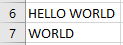
Suppose the two cells A6 and A7 contain the values shown in Figure. The following procedure demonstrates the operations:
Sub StringsExample()
    Dim s As String
    Dim pos As Long  ' Utilisez Long au lieu de Integer pour stocker la position
    Dim searchTerm As String
    Dim lengthSearch As Integer
    ' Active la feuille de calcul
    ThisWorkbook.Worksheets("Sheet1").Activate
    ' Récupère les valeurs dans les cellules
    s = Range("A6").Value
    searchTerm = Range("A7").Value
    lengthSearch = Len(searchTerm)
    ' Vérifie si searchTerm existe dans s
    If Len(searchTerm) > 0 Then
        ' Affiche les premiers caractères
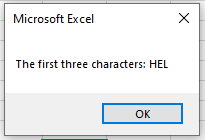
        MsgBox "The first three characters: " & Left(s, 3)
        ' Trouve la position de searchTerm dans s
        pos = InStr(s, searchTerm)
        If pos > 0 Then
            MsgBox "The position of '" & searchTerm & "': " & pos

            ' Utilise WorksheetFunction.Replace
            MsgBox WorksheetFunction.Replace(s, pos, lengthSearch, "WORLD")
        Else
            MsgBox "Search term not found."
        End If
    Else
        MsgBox "Search term is empty."
    End If
End Sub
Explanation:
- The variable s stores the string to be examined, taken from the first worksheet cell.
- The variable searchTerm stores the substring to be found, taken from the second worksheet cell.
- The VBA function Len() returns the length of a string, including all spaces.
- The VBA function Left() returns a substring starting from the first character, with the specified length. Similarly, you can use the VBA functions Right() and Mid() to extract substrings from the end or middle of a string.
- The VBA function InStr() returns the position of the searched substring within the string. Positions start at 1.

- The worksheet function Search() performs the same task as InStr(). It also has an optional third parameter specifying the starting position for the search.
- The worksheet function Replace() replaces a substring with another substring (see Figure 8.22). It requires the following parameters:
- The original string
- The position at which to start the replacement
- The number of characters to replace
- The new substring to insert in place of the old substring