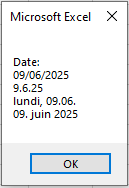
The NumberFormatLocal property, which allows country-specific formatting of numbers and dates in worksheet cells, has already been introduced. Numbers, dates, and texts can also be formatted appropriately for display in dialog boxes using the string function Format().
So far, only the MsgBox() function has been presented as a dialog box, but the following formatting options apply to all types of dialog boxes. These formatting techniques are especially useful for custom dialog boxes.
Here are some examples:
Sub FormatExamples()
    Dim x As Single, y As Single
    Dim d As Date
    ' Decimal places
    x = 13 / 7
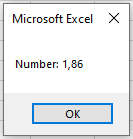
    MsgBox "Number: " & Format(x, "0.00")
    ' Percentage values
    x = 1 / 7
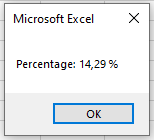
    MsgBox "Percentage: " & Format(x, "0.00 %")
    ' Text and thousand separators
    x = 1399.95
    y = 29.95
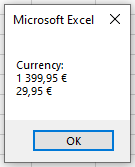
    MsgBox "Currency: " & vbCrLf & Format(x, "#,##0.00 €") & _
           vbCrLf & Format(y, "#,##0.00 €")
    ' Date formatting
    d = "09.06.2025"
    MsgBox "Date: " & vbCrLf & d & _
           vbCrLf & Format(d, "d.m.yy") & _
           vbCrLf & Format(d, "dddd, dd.mm.") & _
           vbCrLf & Format(d, "dd. mmmm yyyy")
End Sub
Explanation:
The second parameter of the Format() function is a string specifying the desired format in English notation.
- The digit 0 represents a single digit that is always displayed. Decimal places are separated by a period, and the number is rounded to the specified number of decimal places, as shown in Figure.
- The percent sign % multiplies the number by 100 and appends a percent sign, as seen in Figure.
- The # symbol represents a single digit, but only if the number has that digit; otherwise, nothing is displayed. The comma is used as a thousands separator. Text, such as currency symbols, can be included along with the number, as shown in Figure.
Note:
Right-aligned numbers are possible. However, since text in a MsgBox uses a proportional font (characters have different widths), commas in numbers of varying length will not align perfectly under each other. This alignment is possible inside controls in custom dialog boxes.
The default date output format (without specifying a format) is dd.mm.yyyy, meaning two digits for day, two for month, and four for the year. Using dddd outputs the full weekday name. The format mmmm outputs the full month name, as shown in Figure.