
For data export purposes, it is often necessary to concatenate records beforehand. This task is handled by the Join() function. It converts a one-dimensional array into a string, separating each element of the array with a specified delimiter.
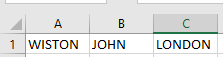
Here is an example:
Sub ConcatenateRecords()
    Dim i As Integer
    Dim arr(1 To 3) As String
    ThisWorkbook.Worksheets("Sheet3").Activate
    For i = 1 To 3
        arr(i) = Cells(1, i).Value
    Next i
    Cells(2, 1).Value = Join(arr, "#")
End Sub
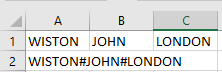
Explanation:
An array with three elements is declared.
In this example, the data of one record are located in three adjacent cells in the first row. These values are assigned to the individual array elements.
The Join() function concatenates the elements of the array into a single string, separating them with the # character.
If no delimiter is specified, a space character is used as the default separator.