Excel 2013 introduced the worksheet function IsoWeekNum(), which calculates the calendar week number according to the ISO 8601 standard. According to this international norm, a calendar week is defined as a seven-day period starting on a Monday. The first calendar week of a year is the one that contains a Thursday.
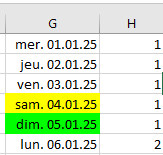
The following procedure, WeekNum(), calculates the ISO week number for each date in the list of 31 days from January 2025:
Sub WeekNum()
    Dim i As Integer
    ThisWorkbook.Worksheets("Sheet1").Activate
    For i = 1 To 31
        Cells(i, 8).Value = WorksheetFunction.IsoWeekNum(Cells(i, 7).Value)
    Next i
End Sub