
When writing CSV files, the individual parts of each record are combined into a single string with delimiters using the Join() function.
Sub WriteCsv()
    Dim i As Integer, k As Integer
    Dim T(1 To 5) As String
    ThisWorkbook.Worksheets("Sheet2").Activate
    On Error GoTo ErrorHandler
    ' Open the file for writing
    Open ThisWorkbook.Path & "C:\Users\POPOLY\Desktop\DocumentCsv.txt" For Output As #1
    For i = 1 To 3
        ' Collect each cell value of the row into array T
        For k = 1 To 5
            T(k) = Cells(i, k).Value
        Next k
        ' Write the concatenated line with "#" as delimiter
        Print #1, Join(T, "#")
    Next i
    ' Close the file
    Close #1
    Exit Sub
ErrorHandler:
    MsgBox Err.Description
End Sub
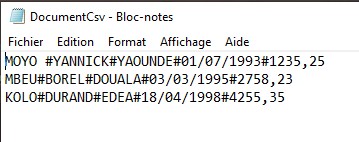
Explanation:
All parts of a record are stored within an array. Using the Join() function along with a delimiter character—in this example, the # symbol—a single string is created for each record.
This concatenated string is then output as a line in the CSV file named linesCsv.txt.
This process is repeated for all records in the Excel table.