
As an example of a select query, consider the simplest case: retrieving all records from a table including all fields.
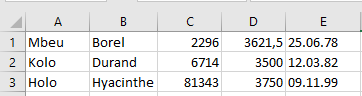
Code example:
Sub SelectQuery()
    Dim cn As ADODB.Connection
    Dim rs As ADODB.Recordset
    Dim i As Integer
    Dim SQLCommand As String
    ThisWorkbook.Worksheets("Sheet4").Activate
    On Error GoTo ErrorHandler
    Set cn = New ADODB.Connection
    cn.ConnectionString = _
        "Provider=Microsoft.ACE.OLEDB.12.0;Data Source=" & _
        ThisWorkbook.Path & "\salary.accdb;"
    cn.Open
    SQLCommand = "SELECT * FROM personen"
    ' MsgBox SQLCommand ' Uncomment for debugging
    Range("A1:E4").Clear
    Set rs = cn.Execute(SQLCommand)
    i = 1
    Do While Not rs.EOF
        Cells(i, 1) = rs("name")
        Cells(i, 2) = rs("vorname")
        Cells(i, 3) = rs("personalnummer")
        Cells(i, 4) = rs("gehalt")
        Cells(i, 5) = rs("geburtstag")
        rs.MoveNext
        i = i + 1
    Loop
    rs.Close
    cn.Close
    Set rs = Nothing
    Set cn = Nothing
    Range("E:E").NumberFormatLocal = "dd.mm.yy"
    Range("A:E").Columns.AutoFit
    Exit Sub
ErrorHandler:
    MsgBox Err.Description
    Set cn = Nothing
End Sub
Explanation:
- Two object variables are declared: one for the ADODB.Connection and one for the ADODB.Recordset.
- Because database access often involves many potential errors, error handling is implemented with On Error. Common errors might include the database file missing at the specified location or syntax errors in the SQL statement. Helpful error messages facilitate troubleshooting.
- A new ADODB.Connection object is instantiated and assigned to the variable cn.
- The ConnectionString property is set with the provider (Microsoft.ACE.OLEDB.12.0) and the data source pointing to the firma.accdb file located in the same folder as the workbook.
- The connection is opened with cn.Open.
- The SQL command string « SELECT * FROM personen » selects all fields (*) from the table personen.
- This SQL command is stored in a string variable for easier management, especially useful if it includes user inputs. For debugging, you can display it with MsgBox.
- The output range (A1:E4) is cleared to prepare for fresh data.
- The Execute() method of the connection sends the SQL command and returns a Recordset object assigned to rs.
- The EOF property signals when the end of the recordset is reached, controlling the Do While loop.
- Within the loop, field values are accessed by rs(« <fieldname> ») syntax.
- The MoveNext() method moves to the next record.
- After processing, the recordset and connection are closed via Close(), and object variables are set to Nothing to free resources.
- Finally, the date format for column E is set, and columns A to E are auto-fitted to content.
- Additional commented SQL commands can be found in the example workbook for further study.