
This and the following sections explain the most important SQL commands through typical examples and their effects. You can find the corresponding SQL statements commented in the procedures Auswahlabfrage() and Aktionsabfrage() in the workbook Mappe9.xlsm, Module 5.
The SELECT statement is used to retrieve records for display. An initial example using SELECT * FROM personen was already shown. Here are further examples:
Selecting Specific Fields
SQLCommand = « SELECT name, vorname FROM personen »
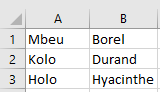
This query requests only the values from the fields name and vorname for all records, as shown in Figure 9.46.
- The result set is smaller because it contains only these two fields.
- Other fields are not included and therefore cannot be accessed in the processing loop.
- For this query, the processing loop is shortened accordingly:
Do While Not rs.EOF
    Cells(i, 1) = rs("name")
    Cells(i, 2) = rs("vorname")
    rs.MoveNext
    i = i + 1
Loop
Restricting Selection with a Condition
SQLCommand = « SELECT * FROM personen WHERE gehalt > 3600 »
- The WHERE clause allows you to specify conditions, similar to an If statement.
- The result contains only those records that satisfy the condition—in this case, those where the value in the gehalt (salary) field is greater than 3600, as shown in next Figure.

Selecting by String Value
SQLCommand = « SELECT * FROM personen WHERE name = ‘Mbeu »
- When comparing string or date values, the value must be enclosed in single quotes (‘) (not to be confused with double quotes used for strings in VBA).
- The result of this query is shown in next Figure.

Note: The displayed results refer to the original values in the table before a 5% salary increase.