
You can influence the order of records returned by a query using the ORDER BY clause. You can specify one or multiple sorting keys. By default, sorting is in ascending order. To sort in descending order, use the keyword DESC.
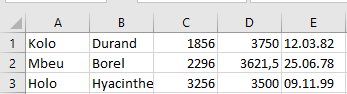
Example 1: Sorting by Salary Descending
SQLCommand = « SELECT * FROM personen ORDER BY gehalt DESC »
- The records are sorted in descending order based on the gehalt (salary) field, as shown in next Figure.
Example 2: Sorting by Last Name and First Name
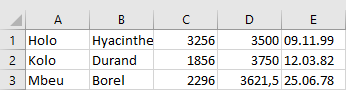
SQLCommand = « SELECT * FROM personen ORDER BY name, vorname »
- The records are sorted in ascending order by the name field (last name).
- If multiple records share the same last name, they are further sorted by the vorname (first name) field, also ascending, as shown in next Figure.
Note:
To demonstrate this query more clearly, a temporary record (Maier, Wolfgang) was added.