
Text boxes are used to input text or numeric values. Label controls (commonly called labels) display captions, which are usually text or numbers shown to the user but not editable by them.
In the following example from the UserForm module frmText, there are three labels, three text boxes, and three command buttons.
- The first two text boxes allow the user to enter two numbers.
- The sum of these two numbers is displayed in the third text box when the first command button is clicked.
- When the second command button is pressed, the same sum is written to a worksheet cell.
- The third command button is used to close the application.
The three labels are named lblZahl1, lblZahl2, and lblErgebnis. The three text boxes are named accordingly: txtNumber1, txtNumber2, and txtResult.
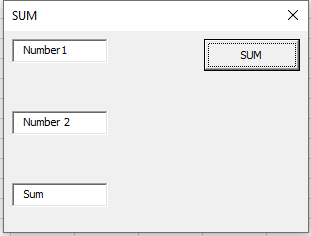
Code for the first command button’s event procedure:
Private Sub cmdTextBox_Click()
    If Not IsNumeric(txtNumber1.Text) Or _
       Not IsNumeric(txtNumber2.Text) Then
        MsgBox "Please enter numbers"
    Else
        txtResult.Text = CDbl(txtNumber1.Text) + CDbl(txtNumber2.Text)
    End If
End Sub
Explanation:
The Text property of a text box contains the string entered by the user.
First, the VBA function IsNumeric() checks whether the content of both text boxes can be converted into numeric values.
If both entries are numeric, they are converted from strings to numbers using the CDbl() function. The two numbers are then added together.
This approach allows users to input numbers naturally, including decimal numbers separated by a decimal comma.
The result is displayed in the third text box.
Code for the second command button’s event procedure (output to worksheet):
Private Sub cmdTabellenblatt_Click()
    If Not IsNumeric(txtNumber1.Text) Or _
       Not IsNumeric(txtNumber2.Text) Then
        MsgBox "Please enter numbers"
    Else
        ThisWorkbook.Worksheets("Sheet1").Range("A1").Value = _
            CDbl(txtNumber1.Text) + CDbl(txtNumber2.Text)
    End If
End Sub
Explanation:
Again, the text boxes are checked to ensure valid numeric input.
The sum is then transferred to cell A1 on the first worksheet of the workbook.
Note:
Remember that values entered in dialog boxes are lost after the dialog is closed and unloaded. Therefore, data must be transferred to the worksheet before closing the dialog.