
When outputting to controls within custom dialog boxes, this function offers additional benefits.
Below is a dialog box example from the UserForm module frmAusgabeformat where a small table is displayed both in a list box and in a label control.
For both controls, the Font property is initially set to Courier New. This is a monospaced font, meaning each character occupies the same width. This uniform spacing is important for tabular formatting.
Additionally, the label control’s SpecialEffect property is set to 2 (fmSpecialEffectSunken), which creates a slightly sunken (3D) appearance to make the label visually distinct.
Application code:
Private Sub UserForm_Initialize()
    Dim ID(1 To 3) As Integer
    Dim Product(1 To 3) As String
    Dim Price(1 To 3) As Single
    Dim Line As String
    Dim i As Integer
    ' Initialize arrays
    ID(1) = 5
    ID(2) = 11
    ID(3) = 346
    Product(1) = "Apple"
    Product(2) = "Banana"
    Product(3) = "Potato"
    Price(1) = 2
    Price(2) = 1.95
    Price(3) = 2.5
    For i = 1 To 3
        ' Compose formatted output line
        Line = Format(ID(i), "@@@@") & " " & _
               Format(Product(i), "!@@@@@@@@@@@@") & _
               Format(Format(Price(i), "0.00 €"), "@@@@@@@")

        ' Add line to list box and label caption
        lstTable.AddItem Line
        lblTable.Caption = lblTable.Caption & Line & vbCrLf
    Next i
End Sub
Result:
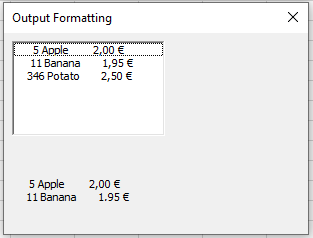
Explanation:
First, three arrays of types Integer, String, and Single are declared and populated with values.
The corresponding elements from these arrays are concatenated into a formatted string.
This string is added both to the list box and to the label control.
- The formatting string @@@@ ensures the integer number is output right-aligned with a fixed width of 4 characters (@ represents one character placeholder).
- Using the exclamation mark ! causes left-aligned output. In this case, the formatting string !@@@@@@@@@@@@ outputs the string left-aligned with a fixed width of 12 characters.
- A nested use of the Format() function is applied for the price: the inner format « 0.00 € » converts the number into a string with two decimal places followed by the euro symbol.
- The outer Format() ensures this string is right-aligned with a fixed width of 7 characters using the format string @@@@@@@.