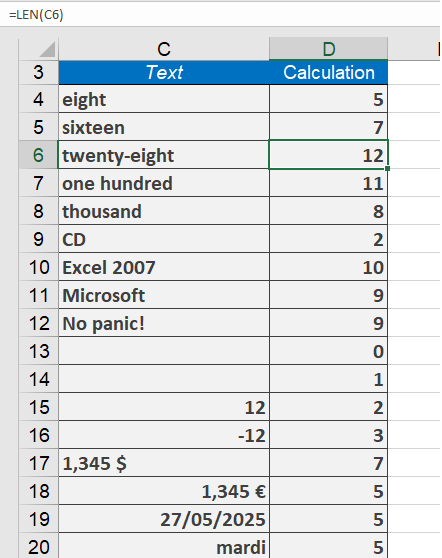
The LEN() function returns the number of characters in a string. The LENB() function returns the number of bytes used by double-byte characters in a string.
Syntax
LEN(text)
LENB(text)
Arguments
- text(required): The text for which you want to determine the length.
Background
This function is useful for various tasks, such as combining it with other functions like MID(), LEFT(), or RIGHT() to manipulate strings.
You can use LEN() to verify whether an entry meets a specific length requirement or to check if text in a column exceeds a defined limit. The function counts spaces and numerals as characters.
Example
Suppose you need to ensure that interface descriptions in a column do not exceed 10 characters. You can use LEN() along with AutoFilter to quickly identify and correct strings longer than 10 characters.
Additional examples:
- =LEN(« CD »)returns 2.
- =LEN(« Excel 2007 »)returns 10.
- =LEN(« Microsoft »)returns 9.
- =LEN(« No Panic! »)returns 9.
- =LEN(« »)returns 0.
- =LEN( » « )returns 1.
- =LEN(« 1.345 $ »)returns 7.
- =LEN(TODAY())returns 5.