
The REPLACE() function substitutes a portion of old_text (beginning at start_num and spanning num_chars) with new_text.
The REPLACEB() variant handles double-byte characters (using byte counts instead of character counts).
Syntax
REPLACE(old_text; start_num; num_chars; new_text)
REPLACEB(old_text; start_num; num_bytes; new_text)
Arguments
- old_text (required): The original string to modify.
- start_num (required): The position (1-based) where replacement begins.
- num_chars/num_bytes (required): The length of text to replace (in characters/bytes).
- new_text (required): The text to insert.
Background
Use REPLACE() to:
- Swap fixed-length segments within strings (e.g., placeholders or formatted sections).
- Modify specific positional patterns (unlike SUBSTITUTE(), which replaces all occurrences of a substring).
Key Differences from SUBSTITUTE
- REPLACE() targets text by position/length.
- SUBSTITUTE() replaces all instances of a specific substring.
Examples
- Replacing a word with a symbol
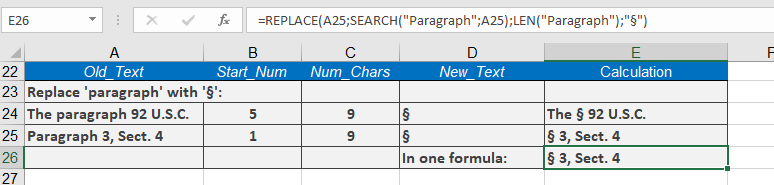
Cell B25 contains « Paragraph 3, Sect. 4 »:
=REPLACE(A25; SEARCH(« paragraph »; A25); LEN(« paragraph »); « § »)
Result: « § 3, Sect. 4 »
Additional Notes
- Returns #VALUE! if start_num exceeds old_text length.
- For partial replacements (e.g., middle characters in a word), combine with LEFT(), RIGHT(), or MID().